
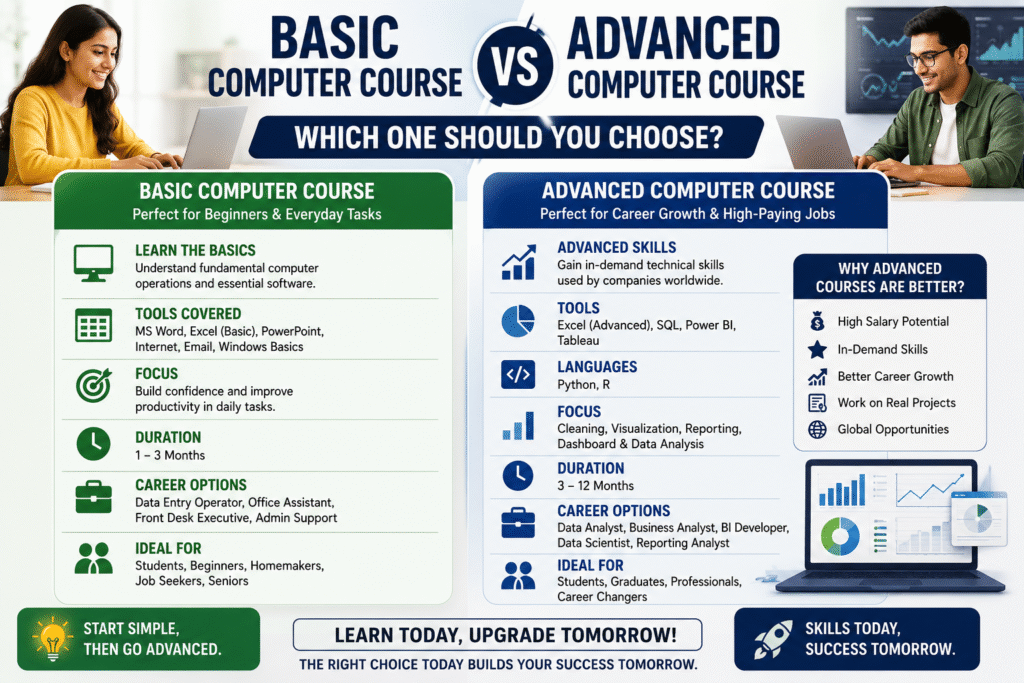
Choosing the right computer course can feel overwhelming, especially with so many options available today. Whether you’re a student, a job seeker, or a working professional looking to upgrade your skills, one question often comes to mind: Basic Computer Course vs Advanced Computer Course: Which One Should You Choose?
The answer depends on your current skill level, car-eer goals, and the type of job you want in the future. While a basic computer course builds a strong foundation, an advanced computer course equips you with specialized skills that employers actively seek.
In this guide, we’ll compare both options to help you make an informed decision and choose the course that aligns with your ambitions.
Why Computer Skills Are Essential Today
In today’s digital world, computer literacy is no longer an added advantage-it’s a necessity. Businesses across industries rely on technology for communication, data management, marketing, finance, and customer service.
From small businesses to multinational companies, employers look for candidates who are comfortable using digital tools and software. That’s why investing in the right computer course can significantly improve your career prospects.
Whether you’re deciding between a Basic Computer Course vs Advanced Computer Course, understanding what each offers is the first step.
What Is a Basic Computer Course?
A Basic Computer Course in Nanded is designed for beginners who have little or no experience using computers. It focuses on developing essential digital skills needed for everyday tasks and entry-level jobs.
What You’ll Learn
Computer fundamentals
Microsoft Word
Microsoft Excel (Basic)
Microsoft PowerPoint
Internet browsing
Email communication
File and folder management
Basic typing skills
These courses are easy to understand and provide the confidence needed to work comfortably with computers.
Who Should Choose a Basic Computer Course?
A Basic Computer Course is ideal for:
Students after 10th or 12th
Beginners with no computer knowledge
Homemakers returning to work
Senior citizens learning digital skills
Job seekers preparing for office roles
If you’re starting from scratch, choosing a Basic Computer Course is the smartest first step.
What Is an Advanced Computer Course?
An Advanced Basic Computer Course in Nanded focuses on industry-specific technical skills that prepare learners for high-demand careers.
Instead of only learning how to use software, students develop practical skills that solve real business problems.
Popular Advanced Skills Include
Tools
Excel (Advanced)
SQL
Power BI
Tableau
Programming Languages
Python
R
Focus Areas
Data Cleaning
Data Visualization
Business Reporting
Dashboard Creation
Database Management
Data Analysis
Advanced computer courses also include practical projects that prepare students for real workplace challenges.
Basic Computer Course vs Advanced Computer Course: Key Differences
| Feature | Basic Computer Course | Advanced Computer Course |
| — | – | — |
| Skill Level | Beginner | Intermediate to Advanced |
| Duration | 1–3 Months | 3–12 Months |
| Learning Focus | Computer Fundamentals | Professional & Technical Skills |
| Career Opportunities | Office Assistant, Data Entry Operator | Data Analyst, BI Analyst, Digital Marketer, Developer |
| Software Covered | MS Office, Internet | Excel, SQL, Power BI, Tableau, Python, R |
| Salary Potential | Entry-Level | Higher Growth Opportunities |
When comparing Basic Computer Course vs Advanced Computer Course, the biggest difference lies in career opportunities and earning potential.
Why Advanced Computer Courses Are Becoming More Popular
Technology has transformed the job market. Employers now look for candidates who can analyze data, automate tasks, and create reports that support business decisions.
Advanced Basic Computer Course in Nanded teach practical skills that companies actively hire for.
Students learn to work with:
Excel for advanced data management
SQL for querying databases
Power BI and Tableau for interactive dashboards
Python and R for automation and data analysis
The primary focus is on cleaning, visualization, and reporting, helping organizations make data-driven decisions.
These skills are valuable across industries such as healthcare, finance, retail, manufacturing, marketing, logistics, and IT.
Which Course Is Better for Students?
If you’ve recently completed your 12th grade and have no prior computer knowledge, it’s recommended to begin with a Basic Computer Course to understand the fundamentals.
However, if your goal is to build a high-paying career in technology, business analytics, or digital marketing, transitioning to an Advanced Computer Course after mastering the basics is the ideal path.
This combination builds both confidence and technical expertise.
Career Opportunities After an Advanced Computer Course
Advanced computer skills open the door to several rewarding career options, including:
Data Analyst
Business Intelligence Analyst
Digital Marketing Analyst
SQL Developer
Python Developer
Reporting Analyst
Dashboard Developer
Business Analyst
Operations Analyst
These roles are among the fastest-growing careers in today’s digital economy.
How to Choose the Right Computer Course
Before enrolling, ask yourself:
What is my current skill level?
Do I want basic computer knowledge or specialized technical skills?
What type of career do I want?
Am I interested in analytics, programming, business, or design?
Does the course include practical projects and certifications?
Choosing a course that matches your goals will help you gain relevant skills and improve your employability.
Final Thoughts
When comparing Basic Computer Course vs Advanced Computer Course: Which One Should You Choose?, there’s no one-size-fits-all answer. A Basic Computer Course is perfect for beginners who want to build confidence with everyday computer tasks, while an Advanced Computer Course is designed for learners who want to develop specialized skills and pursue high-growth careers.
If you’re aiming for better career opportunities, learning advanced tools such as Excel, SQL, Power BI, Tableau, Python, and R can give you a significant advantage. Combined with expertise in cleaning, visualization, and reporting, these skills are highly valued by employers across industries.
The best approach is to start with the basics if needed, then continue learning advanced technologies that align with your career aspirations. Continuous learning is the key to staying competitive in today’s technology-driven world.